USB DAC volume control on Mac
USB DAC volume control on Mac stops working when the DAC has no volume control of its own, and SoundDial brings it back with a software volume for that device and a slider for every app.
You plug in the DAC, choose it as the output, and the volume keys stop doing anything. Music plays at full level unless you reach for a knob, if there is one.
Why the Mac's volume stops working
macOS can only change a device's volume if the device offers a volume control. Many USB DACs and audio interfaces do not, on purpose: they expect a full-level signal and a knob on the device or the amplifier. Audio MIDI Setup (Applications > Utilities) shows the device's format and sample rate, but it has nothing to adjust either.
A volume for the DAC, in SoundDial
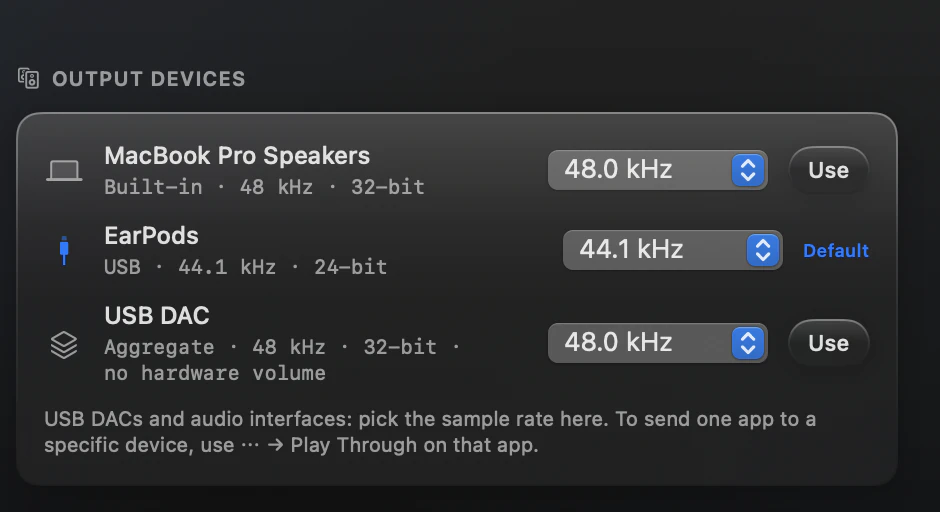
- Format label, for example “48 kHz · 32-bit”
- Sample-rate menu from 44.1 to 384 kHz, when the device offers more than one rate
- Per-app sliders on top, 0% to 200%
For a device without hardware volume, SoundDial's output card shows a “<Device> volume” slider named after your DAC. It explains itself: “This device has no volume control of its own, so SoundDial sets the level for every app.” The level is applied as software gain to every app SoundDial controls and remembered per device.
DAC for music, something else for the rest
Keep your headset as the main output and send only Spotify to the DAC with Play Through in its ⋯ menu. Several apps can play on different devices at once.
Read more on this
FAQ
Does SoundDial change the DAC's hardware?
No. For a device without its own volume control, SoundDial lowers the level of the apps it controls in software. A device that has hardware volume keeps its normal output volume.
Why is there no sample-rate menu for my device?
The menu appears only when the device offers more than one rate.
Will the level be the same next time I plug the DAC in?
Yes. The software volume is remembered per device.
SoundDial: a volume slider and mute button for every app.
€14.99 one-time purchase · macOS 14.2+ · no subscription