A different audio output for each app on Mac
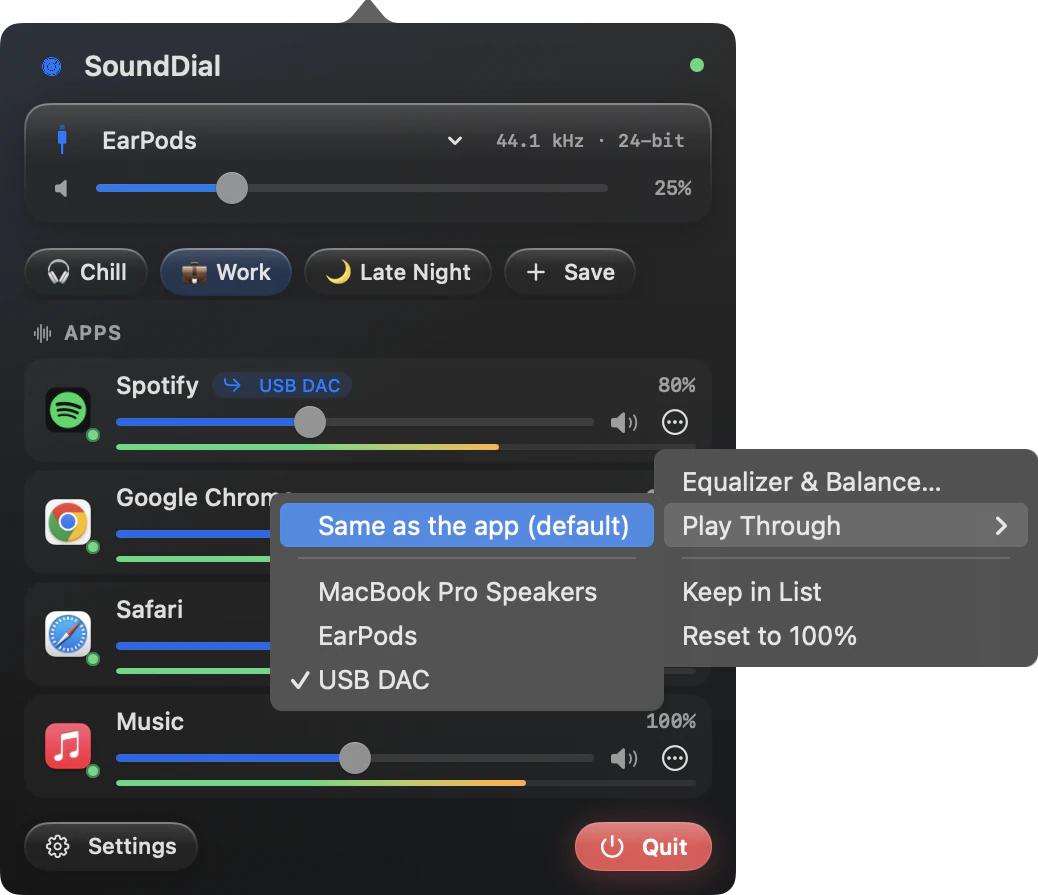
To use a different audio output per app on Mac, open SoundDial, choose Play Through in the app's menu and pick the device; the other apps keep playing where they were.
Music on the desk speakers, the meeting in your headphones. Change the Mac's output and everything follows it: the call, the music, every notification.
What macOS gives you
System Settings > Sound > Output picks one device for every app that follows the system setting. Audio MIDI Setup can build a Multi-Output Device, but that sends the same audio to several outputs at once; it does not separate apps. Some call apps have their own speaker setting, many apps have none.
Play Through in SoundDial
- Connect both devices and start playback in the app
- Open SoundDial and click ⋯ on the app's row
- Choose Play Through, then the device
- To undo, choose “Same as the app (default)”
Several apps can play on different devices at the same time, and each app's row shows its device as a chip. If a device goes away, the app falls back to its own device, then to the system default.
Setups
| Main output | Play Through |
|---|---|
| Speakers | Zoom or Teams to headphones |
| Headphones | Spotify to a USB DAC |
| Monitor speakers | Discord to headphones |
Volume, mute and EQ still work per app on top, and the Shortcuts app has a Set App Output Device action for switching without opening a window.
Read more on this
FAQ
Do profiles save which device an app plays through?
No. Profiles store volume, mute, EQ and balance. With “When an app opens” set to “Remember last”, SoundDial does bring back each app's output device.
Can one app play on two devices at once?
No. Play Through sends an app to one device. For the same audio on several devices, macOS has the Multi-Output Device in Audio MIDI Setup.
Does SoundDial install a virtual audio device?
No. SoundDial installs no virtual driver. Play Through sends an app to an output device you already have.
SoundDial: a volume slider and mute button for every app.
€14.99 one-time purchase · macOS 14.2+ · no subscription