Automate Mac volume per app
To automate Mac volume per app, SoundDial adds six actions to the Shortcuts app and sounddial:// links, so a shortcut or a script can set, mute or route any app.
macOS can set the output volume from a shortcut, but only for the whole Mac. If a meeting shortcut should lower Spotify and leave the call alone, the system has nothing to offer.
The six Shortcuts actions
- Set App Volume: pick an app and a level
- Mute App: Mute, Unmute or Toggle
- Mute All Apps
- Apply Volume Profile
- Set Output Device: the Mac's output
- Set App Output Device: send one app to a device, like Play Through
The actions run without opening a SoundDial window. Put several in one shortcut, for example: apply your Work profile, mute Music, set the call app to 100%.
sounddial:// links
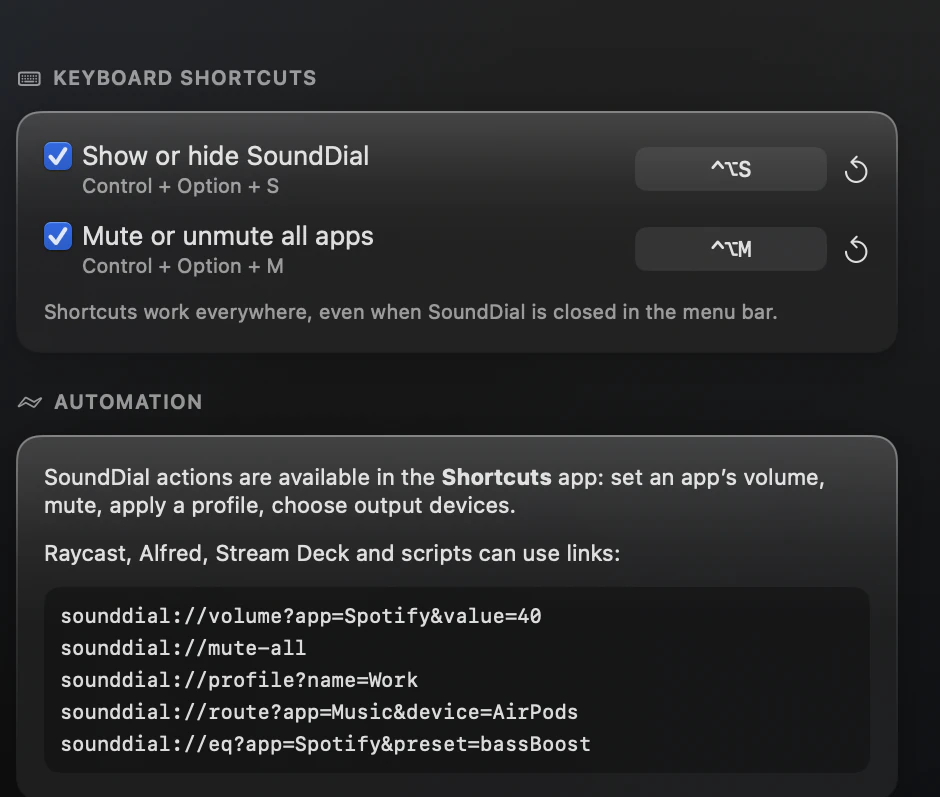
Anything that can open a URL can control SoundDial: a script, a launcher, a button on your desk. The commands are toggle, show, hide, volume (an app and a value from 0 to 200), mute, unmute, toggle-mute, mute-all, profile?name=, profile-save?name=, output?device=, route?app=&device=, eq?app=&preset=, balance?app=&value=, output-volume?value=, sample-rate?value= and settings?section=.
Settings > Shortcuts lists the links, next to the two global hotkeys (Control-Option-S and Control-Option-M).
Ideas to start with
- A “Meeting” shortcut: apply a profile with music low, then set the call app's output to your headset
- Two links for late night: eq with the Late Night preset for your video app, and output-volume a bit lower
- A desk button that runs sounddial://mute-all
What stays manual
Profiles do not store which device an app plays through, so add a Set App Output Device step when a setup needs one. Calls are handled on their own: “Lower other apps during calls” works without any shortcut.
Read more on this
FAQ
Does a SoundDial window open when an action runs?
No. The Shortcuts actions work without opening a window.
Can a link boost an app above 100%?
Yes. The volume command takes values from 0 to 200, like the slider.
Can I save the current mix from a script?
Yes. sounddial://profile-save?name= saves the current mix under that name.
SoundDial: a volume slider and mute button for every app.
€14.99 one-time purchase · macOS 14.2+ · no subscription