Audio level meters on Mac
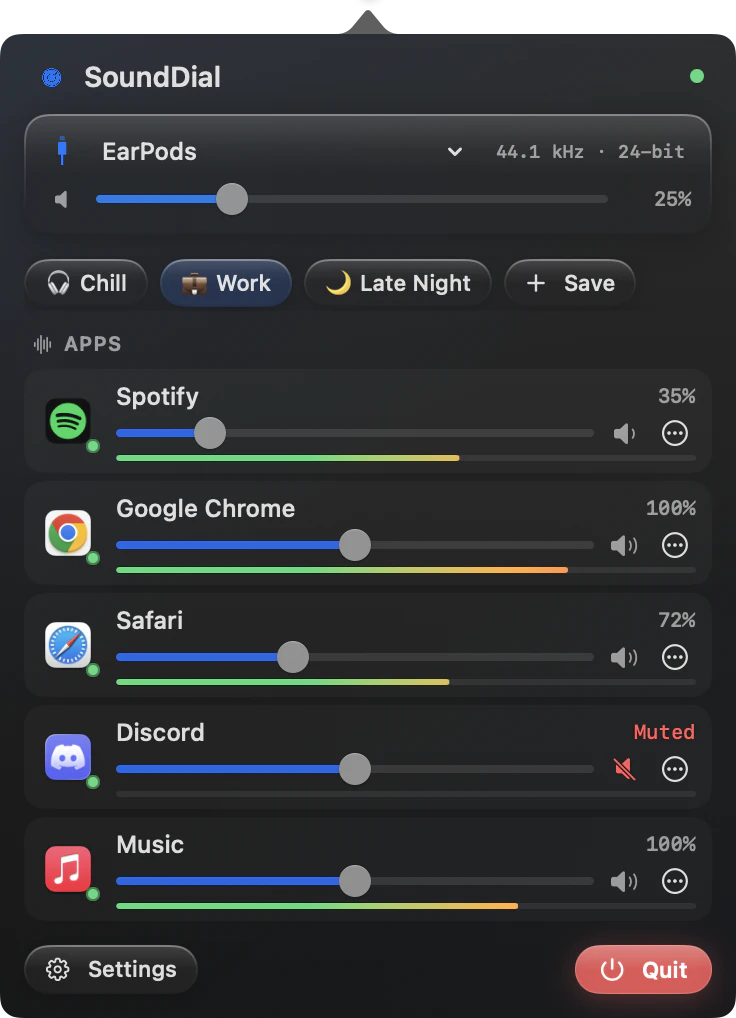
Audio level meters on Mac show how loud each app plays right now, and SoundDial puts one in the row of every app you adjust.
Something is playing, but what? Or a stream sounds quiet and you want to know if it is the app or your headphones. A meter per app answers both at a glance.
What macOS gives you
System Settings > Sound shows an input level for the microphone, but there is no output meter, and none per app. Audio MIDI Setup shows formats, not levels.
Meters in SoundDial
Apps you have adjusted, and apps lowered during a call, show a level meter bar in their row. You see the level next to the slider that changes it: a boosted app next to its amber slider, a ducked app next to its “Ducked” chip. With the default setting, apps you have not touched show no meter.
Meters for every playing app: opt-in
- Open Settings > Audio & Devices > Level Meters
- Turn on “Show live meters for every playing app” (off by default)
With the setting on, SoundDial briefly listens to every playing app while the SoundDial window is open, and only then. Because it listens, macOS shows its audio-recording indicator during that time. That is why it is off by default.
Use the meter to set levels
- Find the app that makes a sudden sound
- Match a quiet video to the music by eye before you boost it
- Check that an app is ducked while a call is on
Read more on this
FAQ
Why do I see the recording indicator?
Only with “Show live meters for every playing app” turned on: metering apps you have not adjusted listens to them while the SoundDial window is open, and macOS shows its indicator for that.
Do meters run when the SoundDial window is closed?
The every-app meters listen only while the window is open.
Can I turn the every-app meters off again?
Yes. Turn the setting off again (it is off by default); apps you adjusted keep their meter.
Does SoundDial have a meter in the menu bar icon?
No. The meters are in the app rows inside the SoundDial window.
SoundDial: a volume slider and mute button for every app.
€14.99 one-time purchase · macOS 14.2+ · no subscription