A Loopback alternative for per-app output
SoundDial is a Loopback alternative for one part of the job only: sending an app to its own output device and setting its volume, without creating virtual audio devices.
Loopback is a tool for passing audio between apps through virtual audio devices. Many people find it while looking for something simpler: music on the speakers, the call in the headphones. For that, a per-app mixer can be enough.
When SoundDial is enough
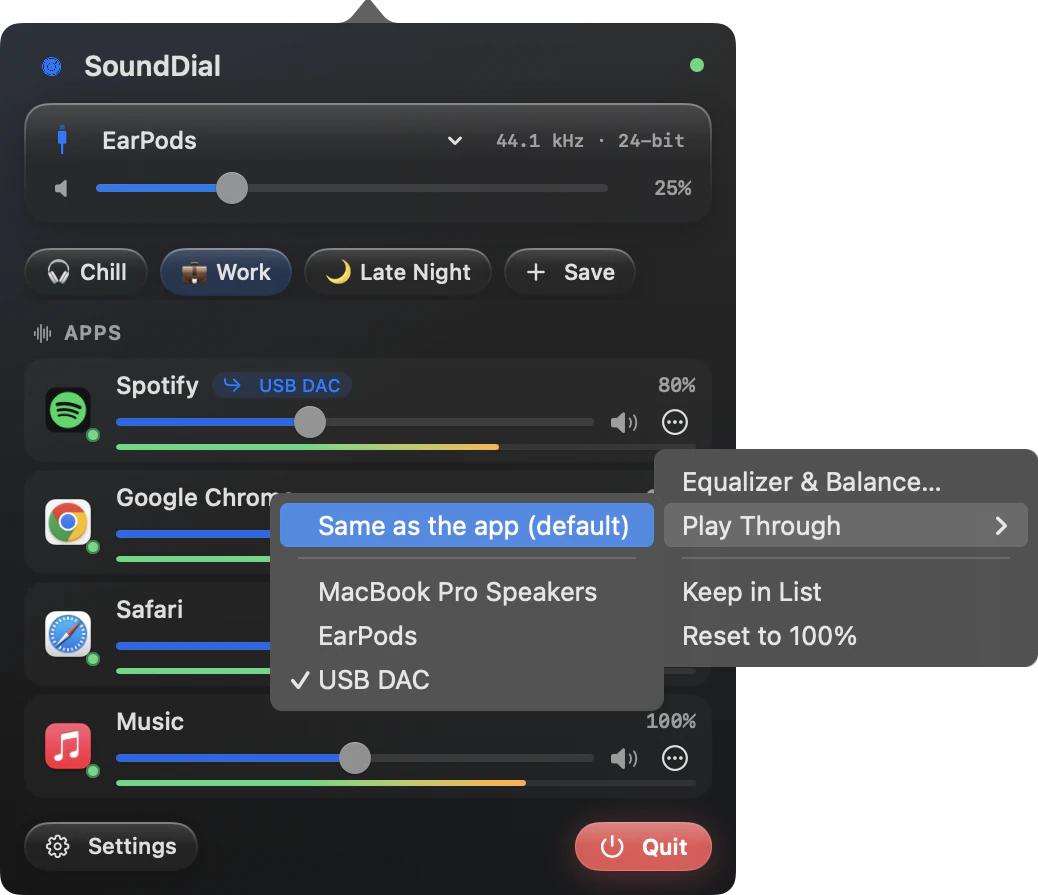
- One app on a different output: Play Through sends Spotify to a USB DAC or Zoom to your headphones
- Several apps on different devices at the same time
- A volume, mute, equalizer and balance for each app
- Music lowered automatically during calls
When it is not
- You need a virtual device that other apps can record from or stream: SoundDial creates none and installs no virtual driver
- You want to feed one app's sound into another app, for example into a call or a recorder
- You need more than two channels: SoundDial is stereo only
For those jobs, look at a virtual audio device and check the vendor's site for Loopback's current features, requirements and price.
SoundDial and Loopback at a glance
| SoundDial | Loopback | |
|---|---|---|
| Per-app output device | Yes: Play Through | See the vendor |
| Virtual audio devices | No | See the vendor |
| Per-app volume, mute, EQ | Yes | See the vendor |
| Where to buy | Mac App Store, €14.99 one-time purchase | See the vendor |
How Play Through works
Click ⋯ on an app's row in SoundDial, choose Play Through and pick the device. If the device goes away, the app falls back to its own device, then to the system default. The Shortcuts app has a Set App Output Device action for the same switch.
Read more on this
FAQ
Can SoundDial send audio into OBS or a call?
No. SoundDial does not create a device that other apps can record from. Play Through sends an app to an output device you already have.
Does SoundDial remember which device each app uses?
Yes, with Settings > General > “When an app opens” set to “Remember last”. Profiles do not store the output device.
Does SoundDial record audio?
SoundDial does not read or record microphone audio. It is sandboxed and has no network access.
SoundDial: a volume slider and mute button for every app.
€14.99 one-time purchase · macOS 14.2+ · no subscription