A Boom 3D alternative for per-app volume
SoundDial is a Boom 3D alternative for Mac users who mainly want a separate volume for each app, sold as a one-time purchase on the Mac App Store.
Boom 3D by Global Delight is an audio enhancement suite: a large equalizer, virtual 3D surround for headphones and a volume booster, with per-app volume as one of its features. SoundDial is built the other way round: per-app mixing is the whole app, with an equalizer and output for each app, and call ducking.
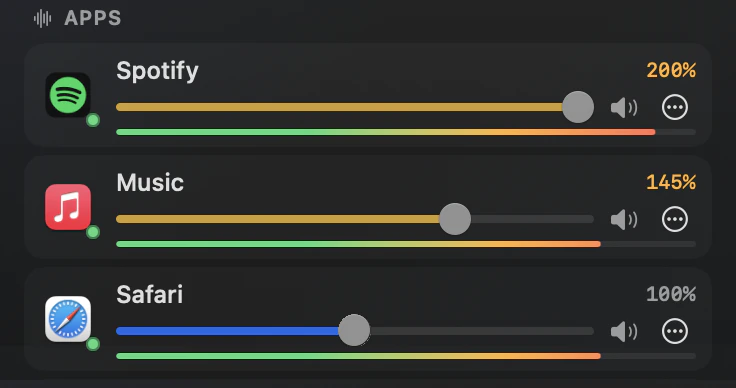
SoundDial and Boom 3D at a glance
| SoundDial | Boom 3D | |
|---|---|---|
| Main focus | Per-app volume mixer in the menu bar | Audio enhancement: equalizer, 3D surround, volume booster |
| Per-app volume and mute | Yes: 0% to 200% per app, mute per app | App Volume Controller (per-app volume, muting chosen apps) |
| Equalizer | Per app: 10 bands (31 Hz to 16 kHz), 11 presets, left/right balance; no system-wide EQ | 31-band equalizer with presets |
| 3D surround for headphones | No, stereo only | Yes, virtual 3D surround |
| Lower other apps during calls | Yes: on by default, 5% to 80% (default 30%) | See the vendor |
| Different output per app | Yes: Play Through | See the vendor |
| Trial | None; Apple handles refunds | 15-day free trial (features page) |
| Price | €14.99 one-time purchase on the Mac App Store, no in-app purchases | Free download on the Mac App Store with in-app purchases: Lifetime Base Pack $49.99, Lifetime Discount Pack $19.99 (US store) |
| Requires | macOS 14.2 or later | macOS 11.0 or later (Mac App Store) |
Boom 3D facts come from Global Delight's features page (globaldelight.com/boom/features) and the Boom3D listing on the US Mac App Store, as of 2026-10-03. Prices differ by country and change; see the vendor for current features and prices.
Pick SoundDial if
- Your problem is one app too loud or too quiet next to the others
- You want each app to have its own EQ, balance and output device, not one sound for the whole Mac
- You want music to drop on its own during calls and come back afterwards
- You prefer one payment on the Mac App Store with no in-app purchases
Pick Boom 3D if
- You want virtual 3D surround on headphones: SoundDial does not do surround; it is stereo only
- You want one equalizer curve for everything your Mac plays: SoundDial has no system-wide EQ
- You want a large set of enhancement presets for music and movies
Both are honest choices for different jobs. Boom 3D changes how your whole Mac sounds; SoundDial sets how loud, and how shaped, each app is.
Switching from Boom 3D
Quit Boom 3D before you try SoundDial, so two tools are not changing app audio at the same time, and check that your normal speakers or headphones are selected in System Settings > Sound. Then open SoundDial from the menu bar and follow the guided setup, which turns on audio access and tests it. For removing Boom 3D itself, follow Global Delight's instructions.
Read more on this
FAQ
Does Boom 3D have per-app volume?
Yes. Global Delight's features page lists an App Volume Controller for muting some apps and turning others up. See the vendor for how it works today.
Does SoundDial have an equalizer?
Yes, per app: 10 bands from 31 Hz to 16 kHz, ±12 dB each, and 11 presets, plus left/right balance. There is no single system-wide EQ.
Can SoundDial boost volume like Boom?
SoundDial boosts one app at a time, up to 200%, while the other apps keep their level.
Can I try SoundDial first?
SoundDial is a paid App Store app with no trial. Apple handles purchases and refund requests through reportaproblem.apple.com.
SoundDial: a volume slider and mute button for every app.
€14.99 one-time purchase · macOS 14.2+ · no subscription